Monday, April 4, 2011

Shailputri Devi


First day of Navratri dedicated to Shailputri Devi

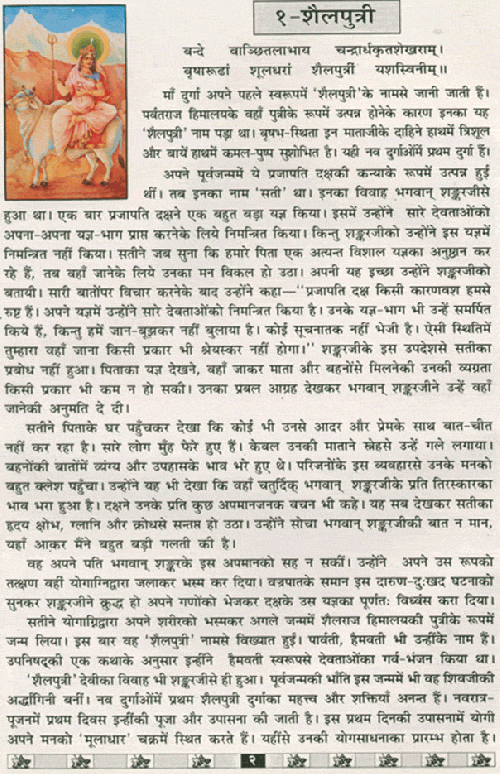
Goddess Durga was born in the house of King of Mountains “Parvat Raj Himalaya”, so she is called “Shailputri” means the daughter of mountain. 1st appearance of Ma-Durga is known as shail-putri. Seated on bull this Mataji has Trisham in right hand and Lotus flower in left hand. She is the 1st Durga in 9 forms. Shailputri is the absolute from of Mother Nature. She is also known as Goddess Parvati the consort of Lord Shiva and mother of Ganesha and Kartikeya. In the Navratra festival the worshiping Mother Goddess has a half moon in her forehead and she is holding a trident in her right hand and lotus flower in her left hand. She rides on mount Nandi a bull.Shailputri is the absolute from of Mother Nature. She is also known as Goddess Parvati the consort of Lord Shiva and mother of Ganesha and Kartikeya. 

In some scriptures like Shivapurana and Devi Bhagvatam the story of Mother Goddess is written as follow: Maa Bhagwati in her earlier birth was born as a daughter of Daksh Prajapati. Then her name was ‘Sati’ and she was married to Lord Shiva. But in a sacrificial ceremony organized by her father Prajapati Daksh, she got her body burnt in the yogic fire, because she could not bear the insult of her husband Lord Shiva by her father Prajapati Daksha in the sacrificial ceremony.In her next birth she incarnated her as Goddess Parvati, the daughter of Parvatraj Himalaya and among Nava Durgas she has been referred to as Sailaputri who was again known as Himavati. In her Haimavati aspect she defeated all prominent gods. Like her previous birth in this life also Maa Shailaputri (Parvati) got married with Lord Shiva. The first and the most prominent among Nava Durgas, Shailaputri is of immense importance and her glories are endless. On the first day of Navratra worship it is she who is worshiped. She is the Devi of the root chakra, who, upon awakening, begins Her journey upwards. Sitting on Nandi, and making her first journey from the Muladarachakra. As from her father to her husband – the awakening Shakti, beginning Her search for Lord Shiva or making a move towards her Shiva. So that, In navrati pooja the first day Yogi’s keep their mind concentrated on Muladhara. This is the starting point of their spiritual discipline. They started their Yogasadha from here. Shaila Putri is the Mooladhara Shakti to be realized within Self and sought for higher depths, in the yogic meditation.
Mantra to chant : 

"Om aim hring kleem chamundayi vichche". For the significance of 'kleem'-- Navratri commences with the first night devoted to the puja of Shailputri devi. 'Shail' means mountain and refers to Parvati, wife of Lord Shiva, the daughter of king of the mountains Himavan. Shailputri holds in her two hands a trident and a lotus. She is mounted upon a bull. Special benediction-as all the shradh souls leave the planet this night the energies specially work on the temple (memory) chakras of all in the planet. This is a major healing of past karma and removing blocks, bestowing lilac light healing trauma emotions and thoughts. We see white seven-pointed stars of light in the sky falling on the shoulders reducing burdens, activating also the navel chakra to create new activities of business, work, healing, our purpose of life and also paying attention to our interaction with others. The stars also accumulate mostly in water and liquids. Take pure water, coconut water, juices, and also serve this to others to, receive added benefit. Distribution of green things will also empower you further. Offering: one pomegranate in the morning and accept as prasadam (blessings) in evening, share with others-offer candles morning and evening (after sunset). Mentally offer all fragrant flowers, fruits, gems, clothing.You can also offer paan leaf (betel leaf) with clove and cardamom.


Sunday, February 6, 2011

11 Superb Concept Phone Designs


from Design Swan 

1. Bio – A Incredible Flip Phone [link]
Here’s a flip phone that could put the “cool” back into clam shells. When a phone call or an email comes to you, “bio” informs you by lifting the edge of its cover. And if you touch it lightly, the cover automatically opens to “B” position. Its movement is not strong, but it helps your action gently. The cover is made of elastomer that is inserted with actuators like artificial muscles. When you enjoy web browsing or movies, the cover is turned to the backside, like a magazine held by one hand. You can hold “bio” tight with the rounded cover as a grap and operate it with buttons that appear on the cover.


Bio - A Incredible Flip Phone


2. Trypoxy Phone [link]
Looks like a smooth pebble but for the ultimate web browsing experience, the rear has a soft-gel-like grab extension that can pulled out. It fits snugly in one hand and has built-in controls to pinch and squeeze your way through the internet with simulated buttons for scrolling and moving back/forth through pages.


Trypoxy Phone

3. Voim – Smartphone Concept for the Blind [link]
It features route navigation, word recognition and object identification, which are displayed as braille on a silicon screen or transmitted as audio cues via the detachable blue tooth headset. Although smart phone applications & braille cell phones do exists, a full-fledged concept like this is a ways away.


Voim - Smartphone Concept for the Blind

4. Transparent Concept Phone [link]
The Second Life Mobile Phone Concept works on the premise that we often forget about the battery life of our mobile phones, hence run out of juice, just at the wrong time. As a remedy (rather power-saver-option) the phone incorporates a double display. When in active use the AMOLED screen powers up in all glory and in standby mode the E-ink display gets active. This essentially means that the E-ink uses very little energy and the degree of transparency of the display shows how much battery is remaining. The more transparent the display, the less battery remaining.


Transparent Concept Phone

5. Blackberry Empathy Phone [link]
The phone is used in conjunction with a biometrics ring that is worn by the user to collect “emotional data”. Spec-wise it features a transparent OLED screen that becomes transparent when not in use and opaque during interaction. The front is all touch surface, while on the back there is a physical keyboard.
It is touch based and all the user’s connections are shown graphically so you can see who is connected to whom. Each contact has an avatar that is encompassed by two colored rings. The inner colored ring shows the contact’s previous emotional state, and the outer ring represents the contact’s current emotional state. It is important to show the shift in emotions in order to see how an event has affected that contact. Another important feature that was the “Emotional Health Chart”. This chart would monitor the user’s emotional health through an indefinite period of time.


Blackberry Empathy Phone

6. Sony Ericsson FH Mobile [link]
Sony Ericsson FH Mobile Phone has a pivotal point to it. It flips vertical on a pivot to mimic a phone and rotates sideways to become a viewing screen for the media functions and web browsing. The phone even becomes an intercom of sorts when split into two, allowing easy communication between the two parties holding each end.


Sony Ericsson FH Mobile

7. 3D Mobile Phone [link]
Focusing on the use of 3D in cellphones, Petr Kubik has designed this all-in-one-piece that includes the glasses, intuitive stylus and expandable screens. The 3D apps support 3D movies and camera plus allow you to make surreal calls with family and friends that pop outta the screen!
Here are some of the specs envisioned for the 3D Mobile Phone:

* Photovoltic screen at the rear for instant recharging
* Dimensions: 66×133x14mm
* Expandable Touch Display size: 177×104mm
* Interactive stylus
* 3D Glasses
* Adjustable Leg Support


3D Mobile Phone


3D Mobile Phone

8. Concept Phone for Deaf [link]
Pratt student Suhyun Kim is quite concerned about the deaf folks and wants them to enjoy technology as much as we do. Her Visual Sound is a mobile phone for the hearing impaired that converts voice input to text and text input to voice. The design features two handy pillars that scroll sideways to expose the roll-out display. To communicate, the impaired person feeds in the text onto the touchscreen display, which gets converted to voice simulation for the person on the other end of the phone and vice verse.


Concept Phone for Deaf

9. Mobile Script Cell Phone Concept [link]
Big screen consists of 2 layers: a soft OLDE – touchscreen and soft nano material hardening in the filing of low-voltage nego. At the time opening screen hard and bouncy, after work on the side of the screen is pressed Eject, and becomes soft and mosey inside. The “Mobile Script” mobile phone does not require a power charge, its case is covered with a nano material, converting the Sun light into the energy for your phone feed. At your phone’s display you can watch how much charge is left at the battery and how strong the power of the light which charges the battery is.


Mobile Script Cell Phone Concept

10. Window Phone [link]
The Window Phone is a concept mobile phone that is able to transform its appearance like a window as per the weather. The phone is designed as a thin, clear and transparent plastic sheet, which remains clear during a sunny day, becomes humid during a rainy day and takes a dump outlook during a snowy day. The user can write text messages or draw pictures on the phone in different weather conditions which will later transform and show as SMS characters. The screen features sensitive interaction with the user and comprises the state of a window in different weather conditions.


Window Phone


Window Phone

11. Next Generation iPhone – NOT A Phone [link]
Ambitious designer Samuel Lee Kwon’s concept design of the iPhone shows just what the folks expect out of Apple products in the future. Samuel’s concept iPhone comprises of a small wrist worn projector that has a few icons of its own. When you click on the respective icons, the main body of the phone gets projected on your palm. Yes, it’s that cool! Turning your palm into a touchscreen, you then start interacting with your phone.


Next Generation iPhone - NOT A Phone
http://www.ekhabar.in/

Saturday, February 5, 2011

How to defeat fear


By When I worked in Bucharest, we’d go out to lunch from time to time. Our office was in a building that had a soup/deli thing on the ground floor.  The other option was a McDonald’s about a block away.  When you were there in the winter, the sidewalks would be covered by ice – public services like salt and scraping were nonexistent – but that wasn’t the biggest kicker.  I had been in numerous freezing cold locales by that point:  Moscow, Siberia, Poland, Boston.  The real problem was the dogs… and the fear of those dogs.


Wild dogs roamed up and down the streets in our part of downtown Bucharest. I don’t know if they were wild dogs, or just abandoned pets, but they seemed bold enough to be wild and tame enough to shy away at the last second from a human.  They were frightening, though.  They’d gather around you and snarl and bark and generally activate your caveman brain’s fear of things with teeth.

We’d watch out the windows around lunchtime to see if the local pack of wild dogs were nearby before setting off for McDonald’s. I’m not sure if they would have attacked.  They acted fierce, and they looked hungry, but I never saw them attack a person.  They were hungry, for sure.  If they came close, I’d throw a rock or two.  Usually that scared them off.  Once or twice it didn’t, and I learned a trick – barking LIKE a dog at a dog freaks them out.  They fear that as much as you might fear them. But before you laugh at me, imagine having a pack of 10-12 hungry wild dogs snarling at you and think about what you’d do in that situation.

We would go to McDonald’s, of course. If you can look out the window and see that you’re likely to make it, you may chance it, because you can only eat soup in the company canteen so many days in a row.  A cheeseburger starts to look like a filet mignon steak after a while.

But those dogs were frightening. Years before going to Bucharest, while living in Moscow, I had read reports of a young woman torn to shreds by wild dogs a few blocks from my home.  You’d have to assume she was drunk, or stoned, or just unlucky.  But people do get attacked by dogs, so a pack of wild dogs is not something to shrug at. Week after week (I spent a lot of time in Bucharest) I’d venture by those dogs…sometimes walking through the midst of them. 

Towards the end, as I mentioned, I snarled at them. They cringed when they saw me coming.  I had little fear of them.  The first time I saw them I was terrified, and the last time I saw them I was caught somewhere between disgust and pity, but fearless. Not to go all Aesop on you here, but the moral of the story is that even things that seem scary can be conquered.  Don’t assume that you will always be afraid.  Someday – if you try hard enough, and beat away at it every day – you’ll beat it.  Fear is just uncertainty about the unknown.

Monday, December 27, 2010

How to Design App Icons for iPhone and iPad

from Web Design Ledger by Jake Rocheleau
Mobile iOS devices have seen some tremendous growth over the 2010 period. With the growing sales of iPads and the popular release of the new iPhone 4 Apple has had an amazing year. Not only in these two markets but all iPod Touch devices are also running iOS which can access the App Store.

Here we’ll be going over brief ideas of how to design icons for iOS devices. There are many sizes and scales which require careful attention to detail and focus. iOS designers are required to submit an icon with their app into the store during publishing.


The process may be time consuming but the rewards are outstanding and provide a true sense of empowerment.

iOS App Development

The main process for designing an app for iOS requires two bits. The frontend design concept requires a branding or icon design to fit in the Apple App Store. Designers are also required to craft UI wireframe concepts for each screen of the mobile app.

Developers then enter XCode and spend hours working with views and libraries to produce a fantastic final result. Combining the graphics and programming can produce amazing applications to stand the test of time.


Designers do not often consider how much work is put into development of a mobile application. The style is different with Android-powered devices where Google hosts an open platform for any and all to build on. The iOS App store is much more exclusive and also offers the greatest chance of reaping a small profit.

Graphics Split on iPhone/iPad

Each icon has a specific size which is used for a certain purpose. The large amount of devices currently running iOS means designers must be on their toes to incorporate a keen icon set with each mobile app.


iPhone/iPod Icon Sizes


Application Icon – 57×57px
iPhone 4 icon – 114×114px
App Store Icon – 512×512px
Spotlight Search – 29×29px
iPhone 4 Spotlight – 58×58px
The iPhone doesn’t have many icon size variations. The official app icon which rests on one of your users’ home screens is 57 pixels length and width. The iPhone 4 supports higher resolution settings so it’s optional to include a 114 pixel icon, though not required.

The largest size necessary of an icon is 512 x 512 pixels. This is a fairly large graphic which is displayed throughout the App Store and when browsing apps in Cover Mode. When opening Photoshop to design a new icon it’s always recommended to start at 512 and scale your way down.


Spotlight search supports slightly smaller sizes for icons. 29×29 may seem downright puny but when you’re viewing the search results screen it’s a fairly intuitive interface. The iPhone 4 similarly supports a Spotlight Search icon refined to 58 x 58 pixels for the higher resolution screens.

iPad Icon Sizes

Application Icon – 72×72px
App Store Icon – 512×512px
Spotlight Search – 50×50px
Settings Icon – 29×29px
The application icon is slightly larger this time around. The app store and cover flow sizes are still the same with an increase in our spotlight search dimensions. The iPad boasts a fairly large tablet touchscreen so icons can fit nicely.


The 29px version previous mentioned can be re-used for iPad as a settings icon. If you create a settings page within the iOS general functionality it will display a small icon next to your tab. This can be nice to allow users to change themes, include different accounts/usernames, and also fiddle with smaller options regarding your app.

Basic Icon Rules

The App Store only accepts applications which offer PNG files for icons. For many detailed reasons PNGs are able to hold deeper colors while not requiring much hard drive space.

You may also notice that icons from the app store have a gloss over their exterior. This is an effect added at runtime and shouldn’t be added into your actual icon. There is a Boolean switch which any app developer can use to turn the glossy icon effect on or off. However most icons benefit from the effect when done properly, so it’s best to leave this setting alone.

The iOS platform also applies rounded corners to icons in most screens. When designing your icon set be sure to keep all corners flat at 90 degrees for a perfect square. This is very important because Apple will add the rounded corner effects for your icons by default. If you apply this beforehand your graphics may publish improperly.

UI Tips & Design Kits

Icon designers should also shy away from using transparency in designs. This is reflected poorly when apps get published to the store since iOS has a difficult time rendering areas from an icon as transparent. If you’d like some inspiration check out our best iPhone apps for web designers.


There are also many resources available to app designers today. Icon artists are fairly open about sharing their projects and love helping the design community with their contribution. Browse the many UI kits for iPhone and iPad development which are free of charge and easy to download.

This has been a developed overview for starting iOS icon design. The process will require months of hard work and dedicated practice to master such an art. However the skills and production value of iPhone apps is tremendous and surely icon design is a skill worth acquiring.

Tuesday, November 9, 2010

A brilliant back pass by Cristiano Ronaldo’s

Atletico 2-0 last night in Derby Real Madrid won the game, but Cristiano Ronaldo was not in his brilliant form.

Ronaldo for the home side struggled to shine. Despite wearing his new Nike Safari shoes. Ronaldo failed to get on the score sheet.following a recent spell in La Liga, Ronaldo is apparently touched a goal which all resulted in.


Ronaldo did   though  bring into being a moment of magic.A viral hit on YouTube  that will likely became and in many ways proved that the Portuguese forward can improvise with the best of them.

Back to Xabi  Alonso, Ronaldo played a looping ball .In the dying moments  of the match.doesn’t sound   that  great does it  ? It was though.

Tuesday, October 26, 2010

E-Prowl Fakers


Move aside B-Town, Indian politicians who have won hand down, with having bogus profiles on most popular social networking site twitter. In real life it may be quite difficult to track them but on Twitter and other social networking web site their bogus profiles are all over the place. I checked out a few biggie politicians profiles and here is what i found sharing with you people.
Real Identity: Rahul Gandhi
Twitter Con : @Owl Gandhi
Tweets: Thank you mahatma U gave country freedom, last name to my family and Delhi ki gaddi.

Real Identity: Sonia Gandhi
Twitter Con : @Sonia GaXdhi President of the Indian National Congress & They know it.
Tweets: Paid news should be banned  & the money better deployed in building robust infrastructure for the poor people.

Real Identity: Dr. Man Mohan Singh
Twitter Con :@DrYumYumSingh:
In her majesty’s service
Tweets Con:I address Myself at a public rally. It was a very moving experience for me. The crowd hardly moved until  I was removed

Real Identity: Laloo Prasad Yadav
Twitter Con: @lalooyadav:If you messing with the Bihar, I am sending you to the Tihar! Mind it, sasuraa!
Tweets: Paul the octopus making good predictions in the football WC. Hum bhi use katoonga next election mein. Par dono box pe hamarhi phtu hoga.

Real Identity: Suresh Kalamadi
Twitter Con: @kalmadispeaks:I am suresh kalmadi- CEO of the Common Wealth Games (CWG)2010 Tweets: skin clinic contacted me.. thy want to test my skin …just to ujnderstand how can it be so thick..WOW ANOTHER WAY 2 MAKE MONEYJ

Real Identity: P Chidambaram
Twitter Con @PChee_D**nBram: Intellectually Arrogant in a party of jokers!
Tweets:Mantra of India. Add Gandhi surname to a person and turn a nerd to the most intelligent.
Visionary person in India!

Saturday, October 23, 2010

Madhya Pradesh "Heart of India"

Madhya Pradesh, heart of India. Uttar Pradesh, Chhattisgarh, Maharashtra, Gujarat and Rajasthan these are neighbor state.Vindhya and Satpura two hill ranges of Madhya Pradesh.
These hills traditionally placing a boundary wall between north and south India. Madhya Pradesh is state of agriculturally fertile have rivers such as Narmada, Tapti, , Chambal and Betwa. Narmada worshipped locally and nationally as a Hindu goddess like Gnga river . Narmada runs between the two hill ranges. 
Madhya Pradesh also known as landscape of plateaus by its natural features. This state is fully naturalized of nature with river valleys hills and forests but here can been seen as plateau land with low hills. Weather of this state is mostly warm and dry. In summer time here unbearably hot weather .


Madhya Pradesh is primarily rural state and its have larger tribal economy which are running with agriculture and forest .Now Madhya Pradesh developing here urban area with most structure way with global presence


Contact Detail 45, Rachna Nagar Near MPSEB Office Govindpura – Bhopal guptaramdulare@gmail.com 0755-4242665 +91-9993573658 http://www.facebook.com/guptaramdulare http://www.twitter.com/guptaramdulare